Improve Compressed Bluetooth Audio on Mac

If you’re experiencing compressed audio when connecting to a bluetooth headset on your Mac, you can change a setting to improve the quality:

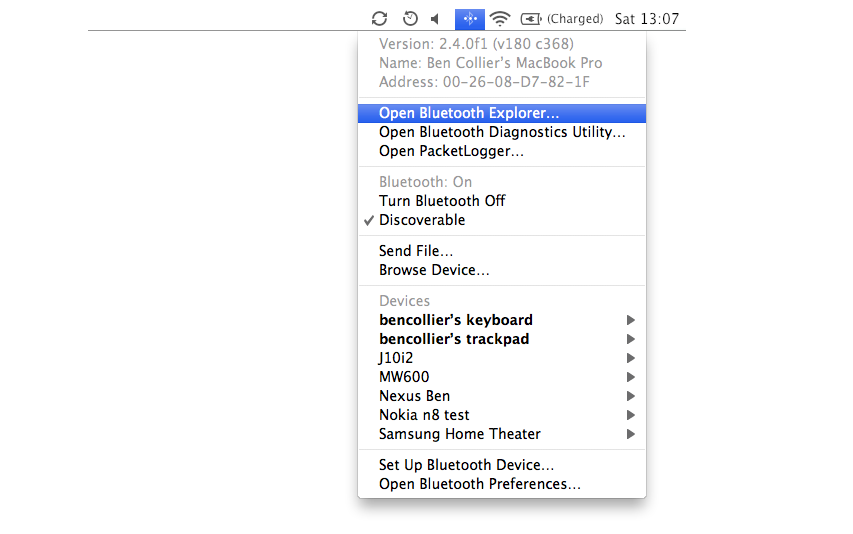
  1. Option (alt) click the bluetooth icon in the menu bar and select Open Bluetooth Explorer.The hidden bluetooth menu - Open Bluetooth Explorer
  2. When Bluetooth Explorer opens, select Utilities then Special Options from the menu bar.Utilities then Special Options
  3. Finally increase the minimum bitpool to around 40 and the maximum bitpool to the maximum, 64. Tick the enable role switching option if it isn’t already enabled.Increasing the bluetooth audio quality by increasing the minimum and maximum bitpool bandwidths
  4. Finally, quit Bluetooth Explorer to save the settings. You might need to turn bluetooth off and on for the changes to take effect.
This increases the bitrate of your A2DP bluetooth audio which lowers the compression of the sounds.

Alternatively you can do this quickly by pasting this command into terminal:

defaults write com.apple.BluetoothAudioAgent "Apple Bitpool Min (editable)" 45

Or run this app: Enhance Bluetooth Audio Quality.app

If you’re looking to get some bluetooth earphones, I highly recommend the Sony Ericsson MW-600 Bluetooth Stereo Headphones.

Xcode – ‘Could Not Read From Device’ iPhone Error

Xcode wasn’t sending builds to my iPhone, failing with the error ‘Could not read from device’.
Xcode Error - "Could not read from device error"

Turning the iPhone on and off didn’t work, and the same error was appearing on a different Mac so I knew it was a problem with the device.

To fix it try:

  1. Synchronise your iPhone in iTunes.
  2. Delete the app you’re trying to install (if it already is).
  3. Synchronise again.

These should work on the iPad; or any iOS device.

Things That Give Me Usability Cramps – Web Forms

Usability Cramps

[yoo-zuh-bill-ity kramps]

  1. n. are unpleasant, often painful sensations caused by unbearable unusable user experience mistakes
  2. v. usability cramping, usability cramped, why the hell did they do this?

Form Labels That Don’t Select the Fields

This one mega-stresses me out; when the text label next to checkbox or a label doesn’t select it when you click it:

Bad Form Field:

To fix this, just give the input field an ID, and the label a for=’inputID’:


This is particularly annoying when there’s lots of checkboxes or really small radio buttons.

tip: add the following CSS to force the browser to show a pointer on clickable labels and buttons:

label, input[type="button"], input[type="submit"] {  cursor: pointer; }

Mobile Sites That Don’t Use the Right HTML(5) Input Types

If you use the correct types for your inputs then touchscreen devices adapt the keyboard to fit the need, and browsers can adjust the UI accordingly.


iOS Screenshot of email keyboard

Using input type='email' brings up an email specific keyboard on iOS

Browsers that don’t understand these new input types default to text, so you’ve got nothing to lose.

Forms That Need to Reload to Validate

It’s so easy to check your forms with a bit of JavaScript, instead of having to refresh the whole page; and generally require any password or captcha fields to be re-enter.

Oh, and if you have a username field, check it’s available before I click submit:

Twitter showing a username's available

Twitter Signup

I’m purposely not linking to any validation scripts; there’s not a universal drop in one I’d want to recommend, however, keep an eye on the native browser support for validation.

Javascript – Is an Object Empty?

To check if an object is empty in Javascript:

Object.getOwnPropertyNames(obj).length === 0;

Where obj is the object you’re testing e.g.:

var obj = {};
Object.getOwnPropertyNames(obj).length === 0; //true

obj = {'not' : 'empty'};
Object.getOwnPropertyNames(obj).length === 0; //false

Or to wrap it in a function:

function isEmpty(obj){
    return (Object.getOwnPropertyNames(obj).length === 0);
}

This only works in ECMAScript 5 compatible browsers, so is useful when developing mobile / desktop web apps.