Last.fm doesn’t autostart with iTunes in Lion [Fix]

Update 04/08/2011: last.fm have updated their client, either use the Check for updates.. in the app or download it.

Still no scrobbling but the release notes show they’ve fixed it for Lion:

1.5.4.28012 (mac) (04/08/11)
—————————-
* Plugin fix for iTunes 10.5
* 64bit version of the plugin for iTunes on Lion

Original:
Sadly the last.fm client doesn’t autostart under Lion when you run iTunes; and there’s yet to be an official update. In fact the entire client has been rather neglected, seeing its last update in October 2010.

If like me, you’ve lost a bunch of scrobbles because you’ve forgotten to open it, you can add last.fm to your login items so it’ll automatically open when your Mac starts.

Open System Preferences then > Users & Groups; select your username and toggle to the Login Items page. Click the + and select the last.fm app to add to the list.

Mac System Preferences - adding last.fm to login items

If like myself, you have the last.fm not show in the dock (and only the menu bar), select the Hidden checkbox.

Unfortunately there’s no iPhone / iPad scrobbling support on Lion yet, and I’m not sure how iOS 5 WiFi sync will be able to handle it..

Xcode Install Requires iTunes to be Closed

When installing or updating Xcode you need to close iTunes for it to complete. If you’ve closed iTunes but still get this message:

In order to continue the install please quit iTunes

Open Activity Monitor and quit iTunes Helper. The installation will now finish.

This mainly seems to happen on beta versions of iTunes. The helper app runs to detect iOS devices being connected so it can auto-open iTunes.

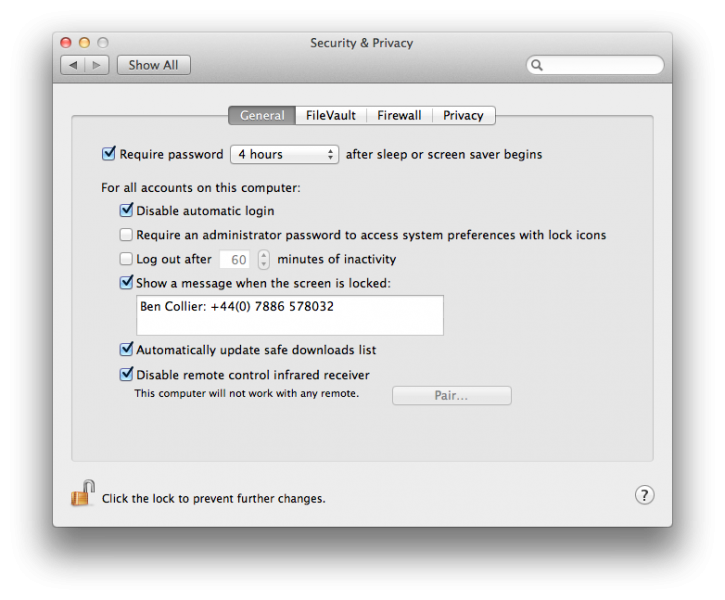
Mac OS X Lion Login Contact Details Message

Screen lock text on Mac OS X Lion

Hey call me! (and give my laptop back)

In Mac OS X Lion you can now add a short message to the login screen. It’s a long shot but adding contact details might increase the chances of a lost machine being recovered by 0.5%.

To update the message go to System Preferences > Security & Privacy > General where you can choose Show a message when the screen is locked.
System preferences screenshot on Mac OS X Lion

Don’t forgot to use your own number, although I am happy for any lost laptops to be sent to me.

Cannot Connect to Facebook Chat in Adium with Lion

Due to some cookie restriction in Lion the latest stable or beta version of Adium cannot connect to Facebook chat.

Luckily they just re-enabled their nightly builds which fix the issue.

Download the latest nightly from: http://nightly.adium.im/

Make sure you get the 1.4.3 nightly currently: http://nightly.adium.im/?repo_branch=adium-1.4-default

As the 1.5 builds are unstable.

Update: Adium have now released a beta fixing this issue: http://beta.adium.im/. Betas are usually more stable than nightlies so use this!

Missing Fonts in Mac OS X Lion (10.7)

After upgrading to Lion I found it disabled a few of the system fonts. This made lots of websites not display as intended and warnings about Missing Fonts in Pages (which had the benefit of artificially inflating my book’s page count bringing it nearer completion).

Turns out Lion can disable certain fonts in certain circumstances; I did a clean install of Lion on a different drive when running the Install Mac OS X Lion app.

You can re-enable the fonts like this:

  1. Open Font Book, it’s stored in your Applications folder. You’ve got Lion now so you could be fancy and use Launchpad.
  2. Find a font that has been disabled – in my case Verdana was the key one. Right click the font and select Enable ‘font name’ Family:
    Enabling the Verdana font in the Font Book on Mac Lion
  3. Repeat this for any other fonts that have been disabled.


You can automatically activate fonts added in the future by ticking Automatic font activation from the Font Book Preferences menu:

 Font Book preference window