Show / Reveal Password Bookmarklet

If you’ve got a password saved, but can’t remember what it is, you can use this bookmarklet to reveal it.
Drag the image to the bookmark bar:

Reveal Passwords
Click the button above to try it out:

If you’re interested in the JavaScript source:

javascript:Array.prototype.slice.call(document.querySelectorAll("input[type='password']"))
    .map(function(el){el.setAttribute('type','text')})

It gets all password inputs and turns their type to text; and should work in modern browsers (like Safari, FF4, Chrome etc) that support ‘querySelectorAll()’.
PhoneGap & The Android Back Button (0.9.5)

In PhoneGap 0.9.5 they’ve updated how the Android back button works. Here’s what to change.

Before in 0.9.4:

BackButton.override();
document.addEventListener("backKeyDown", function() {
    someBackButtonHandlingFunction();
}, true);

Now in 0.9.5:

document.addEventListener("backbutton", function() {
    someBackButtonHandlingFunction();
}, true);

In 0.9.5 and later you no longer need to override the back button, as it’s assumed when you’re adding the event listener that you want to handle the button yourself. Make sure if the user is at the root view of your mobile app, the back button closes the app.

To exit the app in 0.9.4 you’d use:

BackButton.exitApp();

Now, in 0.9.5 you need to use:

device.exitApp();

Good to see PhoneGap advancing to a more device agnostic syntax.

Improve Compressed Bluetooth Audio on Mac

If you’re experiencing compressed audio when connecting to a bluetooth headset on your Mac, you can change a setting to improve the quality:

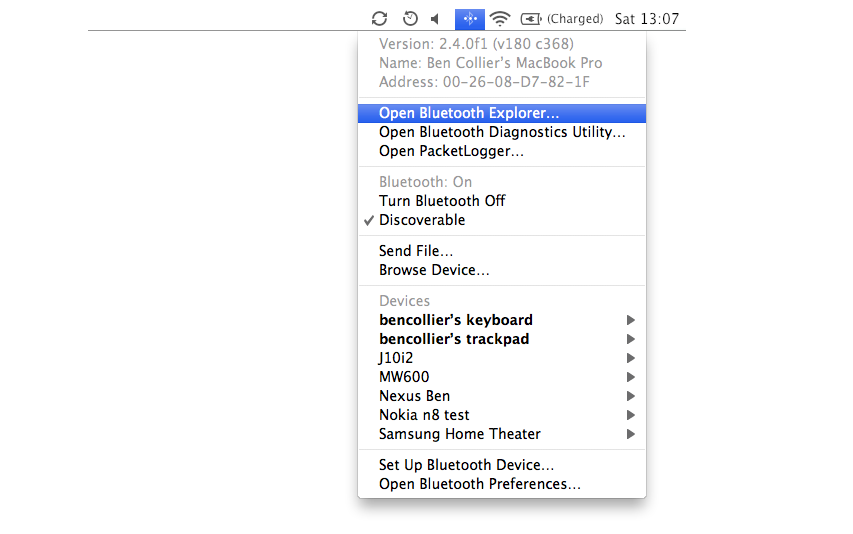
  1. Option (alt) click the bluetooth icon in the menu bar and select Open Bluetooth Explorer.The hidden bluetooth menu - Open Bluetooth Explorer
  2. When Bluetooth Explorer opens, select Utilities then Special Options from the menu bar.Utilities then Special Options
  3. Finally increase the minimum bitpool to around 40 and the maximum bitpool to the maximum, 64. Tick the enable role switching option if it isn’t already enabled.Increasing the bluetooth audio quality by increasing the minimum and maximum bitpool bandwidths
  4. Finally, quit Bluetooth Explorer to save the settings. You might need to turn bluetooth off and on for the changes to take effect.

This increases the bitrate of your A2DP bluetooth audio which lowers the compression of the sounds.

Alternatively you can do this quickly by pasting this command into terminal:

defaults write com.apple.BluetoothAudioAgent "Apple Bitpool Min (editable)" 45

Or run this app: Enhance Bluetooth Audio Quality.app

If you’re looking to get some bluetooth earphones, I highly recommend the Sony Ericsson MW-600 Bluetooth Stereo Headphones.

Apache Benchmarking (ab) on CentOS

I kept forgetting the Apache Benchmark location on CentOS servers, so for my own reference:

# /usr/local/apache/bin/ab

Apache Benchmarking is a great tool for testing Apache performance on web servers, for example running the following bash command:

# /usr/local/apache/bin/ab -n 100 -c 5 http://google.com/ 

This will test 100 connections (-n), limited to 5 concurrent connections (-c) on the website google.com

You can also run Apache Benchmarking straight from Mac terminal using:

# ab -n 100 -c 5 http://google.com/ 

Tip: make sure you end the url to test with a trailing slash or filename or the command won’t work

Google Maps API – Disable Scroll Wheel Zoom

The Google Maps API overrides the scroll functionality of the scrollwheel so it zooms the map, this often causes problems when you have a large map spanning the page.

To prevent this in V3 of the Maps API add:

scrollwheel: false

To your mapOptions when initialising the map.

For example:

var mapOptions = {
	zoom: 14,
	center: point,
	mapTypeId: google.maps.MapTypeId.SATELLITE,
	scrollwheel: false      
}

map = new google.maps.Map(document.getElementById("map"), mapOptions);

Update: Feb 2016

A few people have emailed asking about disabling the scrolling on mobile / touch devices. The API lets you disable dragging by setting the option draggable to true / false. You can do a quick test for touch and disable scrolling using this snipped via Frankey on Stack Overflow:

{draggable: !("ontouchend" in document)};

If you still want to allow scrolling on mobile, you can leave a gutter around the map to aid moving the rest of the page (gross) or put an overlap on the map which disappears on tap to bring focus to the map.